What HTTP 402 enables for APIs
The HTTP 402 status code, labeled "Payment Required," was originally reserved in the HTTP/1.1 specification for future digital payment systems. For years, it sat dormant while the web relied on subscriptions, credit card gateways, and API keys to monetize software. Today, that dormant status code is the foundation of agentic payment infrastructure.
By implementing the x402 protocol, developers can move beyond static pricing models. Instead of forcing users into monthly subscriptions or complex tiered plans, x402 enables instant, per-request micropayments using USDC stablecoins. This shift is critical for the emerging wave of autonomous agents—software bots that need to pay for data, compute, or services without human intervention.
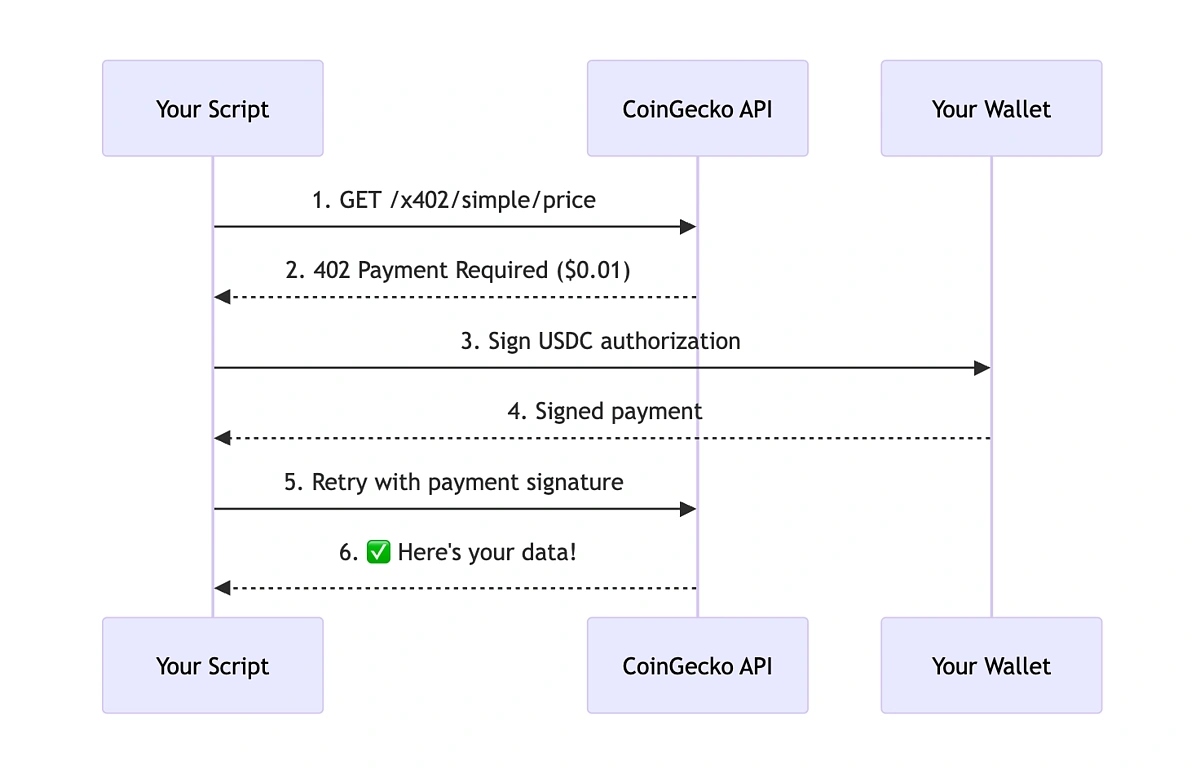
The mechanics are straightforward. When an agent or client makes a request to an x402-enabled API, the server responds with a 402 Payment Required status. This response includes a payment instruction—essentially a crypto wallet address and the exact amount due. Once the client sends the USDC payment, the server verifies the transaction on the blockchain and returns the 200 OK status along with the requested data.
This "pay-as-you-go" model eliminates the friction of account creation and billing cycles. For developers, it means a new revenue stream that scales linearly with usage. For users, particularly AI agents, it means seamless access to resources without the overhead of managing credit cards or subscription renewals. It turns every API call into a potential transaction, creating a more fluid and automated economy.
Set up the payment gateway
Configuring an API to accept cryptocurrency payments via HTTP 402 requires shifting your endpoint logic from simple authentication to transaction verification. Instead of checking an API key, your server must validate that a specific amount of USDC has been transferred to your designated wallet address before releasing the requested data.
This setup relies on the x402 protocol, which embeds the current price of the content directly into the 402 response. The requesting agent sees the updated price, signs the transaction, and sends the payment. Your server then verifies the blockchain confirmation and grants access. This flow ensures you are paid in real-time for every request without needing to manage complex billing cycles or subscription databases.
1. Define your pricing and endpoint logic
Before writing code, determine how you will price your API. You can base this on transaction volume, data usage, or a flat fee per request. For most agentic workflows, a flat fee per request is the simplest starting point. Ensure your endpoint can dynamically return the current price in the 402 Payment Required response header. This allows agents to fetch the cost before committing to the payment.
2. Generate a wallet address for receiving USDC
You need a dedicated wallet address to receive payments. Use a standard Ethereum-compatible wallet (like MetaMask or a programmatic wallet via libraries like ethers.js or viem) to generate a unique address for your service. Keep the private keys secure and never expose them in client-side code. This address will be included in the 402 response so agents know where to send their USDC.
3. Implement the 402 response handler
When a request hits your endpoint, check if the payment has already been verified. If not, respond with an HTTP 402 status code. Include the required headers:
X-Price: The amount of USDC required for this request.X-Payment-Address: Your wallet address.X-Chain: The blockchain network (e.g.,ethereumorbase).
This response tells the agent exactly what to pay and where. It does not block the request permanently; it pauses it until payment is confirmed. This is the core of the pay-per-API model.
4. Verify the transaction on-chain
Once the agent sends the payment, your server must verify it. Use a blockchain explorer API (like Etherscan or BaseScan) or a library like viem to check the transaction status. Confirm that:
- The transaction was sent to your wallet address.
- The amount matches or exceeds the
X-Price. - The transaction has sufficient confirmations (usually 1-3 for most use cases).
Only after these checks pass should you return the actual API data. This prevents fraud and ensures you are paid before providing value.
5. Cache payment status for efficiency
Blockchain verification can be slow. To improve performance, cache the payment status for a short period (e.g., 5-10 minutes) after a successful transaction. This allows subsequent requests from the same agent to bypass the verification step temporarily, reducing latency and blockchain gas costs. However, always re-verify if the cache expires or if the agent sends a new request after a long gap.
Define how much each API call costs. Your endpoint must return this price in the 402 response header so agents know the cost before paying.
Check the blockchain to ensure the payment was sent to your wallet and matches the requested amount. Use a library like viem or an explorer API for this.
Once the transaction is confirmed, return the requested API data. Cache this status briefly to avoid repeated verification for the same agent.
-
Define pricing model per request
-
Generate and secure USDC wallet address
-
Implement 402 response with price and wallet headers
-
Build on-chain transaction verification logic
-
Add payment status caching for efficiency
Choose your pricing model
Picking the right pricing model is the foundation of a sustainable pay-per-API infrastructure. You need a system that scales with your agent's actual usage without breaking the bank or requiring complex subscription management. The most common approaches are volume-based, token-based, and subscription models. Each has distinct trade-offs for developers and product managers.
Volume-based pricing
Volume-based pricing charges a fixed rate per API call, regardless of the data payload size. This is the simplest model to implement and predict. It works well for lightweight requests where the computational cost is consistent per call.
- Pros: Easy to understand and bill. Predictable costs for high-frequency, low-complexity tasks.
- Cons: Can be unfair for heavy payloads that consume disproportionate server resources.
- Best for: Simple data lookups, status checks, or lightweight agent actions.
Token-based pricing
Token-based pricing charges based on the number of input and output tokens processed. This is the standard for LLM-integrated agents. It aligns costs directly with computational complexity, making it fairer for heavy reasoning tasks.
- Pros: Scales with actual compute usage. Fairer for variable-complexity requests.
- Cons: Requires accurate token counting and can be harder for users to predict costs.
- Best for: Generative AI, complex reasoning agents, and data-heavy processing.
Subscription pricing
Subscription pricing offers unlimited or tiered access for a fixed monthly fee. It provides predictable revenue for providers and stable costs for users. However, it can lead to overuse or underutilization.
- Pros: Predictable revenue and user costs. Encourages higher usage.
- Cons: Risk of abuse or overuse. Less fair for low-volume users.
- Best for: High-volume users with consistent daily usage patterns.
Comparison of pricing models
The table below compares the key characteristics of each model to help you decide which fits your agent's architecture.
| Model | Cost Driver | Predictability | Fairness |
|---|---|---|---|
| Volume-based | API calls | High | Low for heavy payloads |
| Token-based | Input/output tokens | Medium | High |
| Subscription | Fixed monthly fee | Very High | Low for low-volume users |
Implementation tips
When implementing pay-per-call APIs, consider using the x402 protocol. It embeds the current price in every 402 response, allowing your agent to see the updated price before paying. This ensures transparency and prevents unexpected charges. You can configure the wallet or payment gateway to handle these micro-transactions seamlessly.
For token-based models, ensure your token counting is accurate and consistent. Use official documentation from providers like Nansen or OpenAI to understand their specific tokenization rules. This avoids discrepancies between your calculated costs and the provider's actual charges.
What is 402 payment required?
The HTTP 402 Payment Required client error response status code is a nonstandard response status code reserved for future use. This status code was created to enable digital cash or (micro) payment systems and would indicate that requested content is not available until the client makes a payment.
How to calculate API pricing?
To calculate API price, consider transaction volume, revenue/cost share, data volume, and user-centric metrics. Transaction volume is based on API call volume. Revenue/cost share charges the end user a percentage of revenue or transaction fees. Data volume is based on gigabytes sent or minutes processed. User-centric pricing is based on the number of active monthly unique users.
What are the payment methods for API?
Payment APIs can accommodate online payments in various forms, including bank transfer, debit card, credit card, ACH, or via payment gateways such as Apple Pay, PayPal, and Google Pay. Whether you have an e-commerce, B2C, or B2B business, payment APIs can provide a seamless checkout experience for your customers.
Handle payment failures and retries
When an API agent hits a 402 Payment Required response, it doesn't mean the service is broken—it means the wallet is empty. The agent must pause, secure the transaction state, and attempt to resolve the liquidity gap before moving on. This workflow prevents indefinite hangs and ensures that temporary balance issues don't result in lost data or broken user sessions.
1. Verify the Error Type
Not all 402s are simple "insufficient funds" errors. Some payment gateways use 402 as a generic catch-all for payment failures, including expired tokens or declined cards (MDN, 2025). Your agent should parse the response body to distinguish between a balance error and a provider-side rejection. If the error is generic, treat it as a balance issue but log the raw response for debugging.
2. Check Balance and Gas
Before retrying, the agent must verify the current balance of the paying wallet. In blockchain-based payment systems, a "low balance" error might actually be a "low gas" error. The agent should check if the wallet has enough native tokens to cover the transaction fee, not just the API cost. If gas is insufficient, the agent should trigger a funding request or switch to a wallet with higher liquidity.
3. Retry with Updated Price
If the balance issue is resolved, the agent should retry the request. However, API prices can fluctuate based on network congestion or dynamic pricing models. The agent should fetch the latest price for the endpoint before retrying. If the price has increased, the agent must ensure the user has approved the new rate. If the retry fails again, the agent should switch to a backup provider or escalate to the user for manual payment.
Payment Failure Checklist
-
Verify the 402 error is not a generic gateway rejection
-
Check wallet balance for both API cost and gas fees
-
Fetch the latest endpoint price before retrying
-
Retry with updated credentials or switch providers if needed
FAQ about 402 payments
What does HTTP 402 Payment Required mean?
The HTTP 402 status code signals that the client must complete a payment before the server will fulfill the request. Originally reserved for future digital cash systems, it is now used by some payment APIs as a generic catch-all for failed payment requests MDN.
How do you calculate API pricing?
API pricing typically relies on four models: transaction volume based on call counts, revenue or cost share percentages, data volume measured in gigabytes or minutes, and user-centric fees based on active monthly users. Choosing the right model depends on your specific monetization strategy and customer base.
What payment methods are supported by payment APIs?
Payment APIs accommodate various methods including bank transfers, debit cards, credit cards, and ACH. They also integrate with modern payment gateways like Apple Pay, PayPal, and Google Pay to ensure a seamless checkout experience for both B2C and B2B customers.
Helpful gear
Use these product recommendations as a starting point, then choose the size, material, and price point that fit how you actually use the gear.

As an Amazon Associate, we may earn from qualifying purchases.
No comments yet. Be the first to share your thoughts!