What HTTP 402 Payment Required means
HTTP 402 Payment Required is a client error response that signals a request cannot be fulfilled until the client makes a payment. Unlike standard 403 Forbidden errors, which block access due to security or permission issues, 402 specifically indicates a financial barrier. This code was reserved for future use in early HTTP specifications to enable digital cash and micropayment systems, making it the technical foundation for pay-per-API models.
In modern API monetization, 402 allows for granular billing. Instead of charging for broad access, providers charge for specific resources or transactions. This is particularly relevant for agentic workflows, where autonomous software agents need to pay for data or compute on demand without human intervention. The status code provides a clear, standardized signal that payment is the prerequisite for service delivery.
Design your pay-per-request pricing model
To set a viable pay-per-request price, you must first isolate your direct infrastructure costs per call. This includes server compute time, database reads, and network bandwidth. Once you have this baseline, add a margin to cover payment gateway fees (typically 1-3% for crypto transactions) and operational overhead.
A common industry benchmark for simple data endpoints is $0.001 per request, as seen with Laevitas API V2 for derivatives data. This low-cost model works because the marginal cost of serving a single JSON response is near zero after fixed infrastructure is covered. For more complex processing, such as AI inference or heavy data aggregation, costs scale with compute time rather than just request volume.
When structuring your pricing, consider three main variables: transaction volume, data volume, and user-centric limits. Volume-based pricing rewards high-frequency users with lower per-call rates. Data-volume pricing charges based on gigabytes returned, which is fair for large datasets. User-centric pricing caps access by active monthly users, protecting against API abuse.
Always test your pricing against competitor APIs. If your cost per request is higher than similar services, ensure you offer unique value, such as real-time data freshness or specialized filters. Remember, the HTTP 402 protocol enables these micropayments without requiring traditional API keys, reducing friction for buyers.
Integrate the 402 payment gateway
To implement the HTTP 402 Payment Required protocol, you need a provider that handles the transaction layer and returns the correct status code. Services like Laevitas and SatGate act as intermediaries, allowing you to define priced endpoints while they manage USDC micropayments [1]. This approach removes the need for traditional API keys and subscription billing systems.
The integration follows a standard workflow: register with the provider, configure your endpoint pricing, implement the 402 response logic, and test the flow with a compatible wallet.
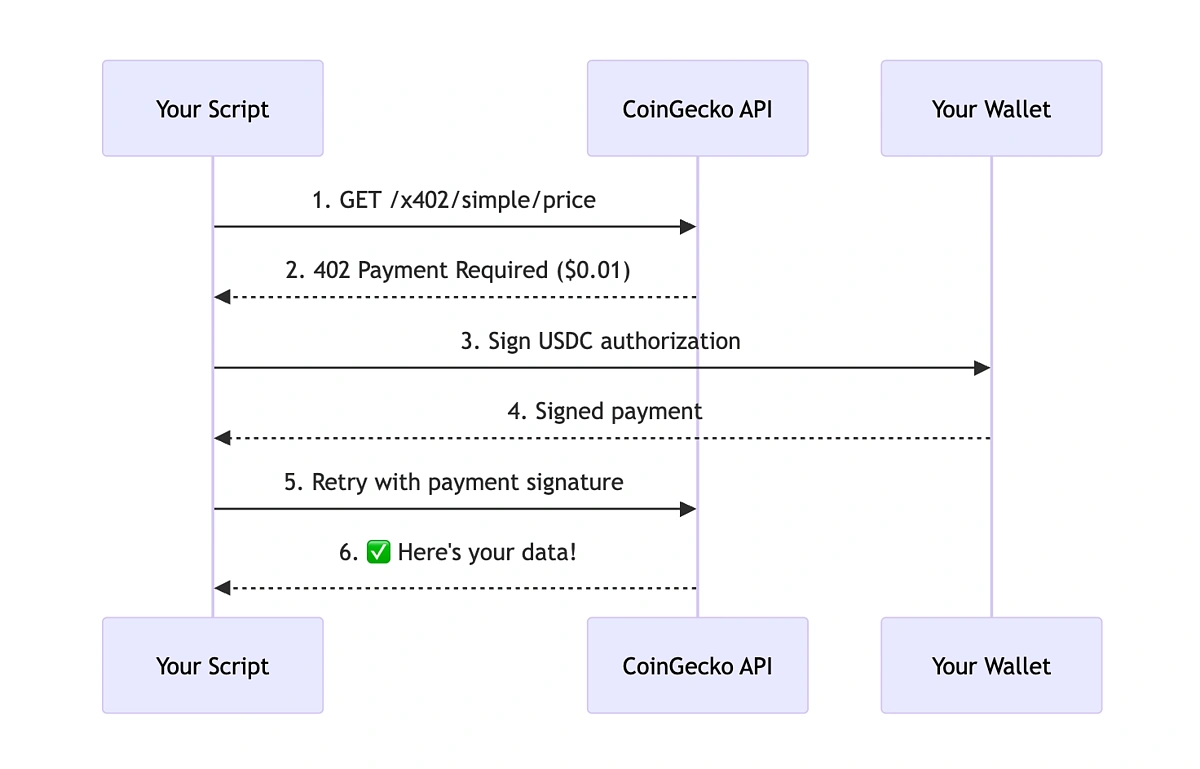
Choose a provider that supports the HTTP 402 standard. Laevitas is a common choice for derivatives data, offering instant USDC micropayments without API keys [1]. SatGate is another option that treats 402 as a paid rail for authority decisions [2]. Create an account and retrieve your unique API credentials or gateway ID.
Define the cost for each API route. For example, you might set a rate of $0.001 per request for market data [1]. Most providers allow you to set pricing in USDC directly through their dashboard or configuration file. Ensure your pricing model aligns with your transaction volume and profit margins.
Update your server-side code to check for payment status before serving data. If the client has not paid, return an HTTP 402 status code with a payment URI in the response headers. This URI tells the client's wallet where to send the funds. If payment is verified, return the requested data with a standard 200 OK status.
Use a Web3 wallet that supports USDC and the 402 protocol to verify the integration. Send a test request to your endpoint. The wallet should prompt for payment when the 402 response is received. Once the transaction is confirmed on-chain, the provider should grant access, and your server should return the data.
Handle failed payments and retries
Payment failures are inevitable in any pay-per-API system. Whether a card is declined, a token expires, or a network timeout occurs, your API must handle these edge cases without breaking the user experience or losing revenue. The goal is to distinguish between temporary glitches and permanent failures, then respond with a clear 402 status code and a structured retry path.
1. Identify the failure type
Not all errors require the same response. A 402 Payment Required should only be returned when the payment gateway explicitly rejects the transaction due to insufficient funds, expired credentials, or billing limits. If the failure is due to a network timeout or a gateway hiccup, return a standard 503 Service Unavailable to signal that the issue is temporary. This distinction prevents unnecessary user friction and allows your client-side code to implement appropriate retry logic.
2. Implement exponential backoff
When a temporary failure occurs, do not retry immediately. Implement exponential backoff to prevent overwhelming your payment processor. Start with a short delay (e.g., 1 second), then double the wait time for each subsequent attempt (2s, 4s, 8s). Cap the maximum number of retries to avoid infinite loops. This strategy is critical for maintaining system stability and ensuring that legitimate requests eventually succeed without causing cascading failures.
3. Provide clear error responses
Your API response must include enough detail for the client to act. Alongside the 402 status, return a structured error object that specifies:
- Error Code: A machine-readable code (e.g.,
CARD_DECLINED,INSUFFICIENT_FUNDS). - Message: A human-readable explanation for the user.
- Retry-After: If applicable, the number of seconds the client should wait before retrying.
This transparency allows your frontend to display specific messages (e.g., "Please update your payment method") rather than generic errors, improving conversion rates and reducing support tickets.
4. Monitor and alert
Set up monitoring for high rates of payment failures. A sudden spike in 402 errors might indicate a problem with your payment provider or a widespread issue with your billing integration. Use these metrics to trigger alerts, allowing your team to investigate and resolve issues before they impact a large number of users. Regularly review failed payment logs to identify patterns, such as specific banks or card types that frequently decline transactions, and adjust your integration accordingly.
Verify transactions and track usage
Monitoring your API usage and confirming payments ensures transparency for both providers and consumers. Without clear tracking, disputes arise over billing accuracy and service availability. This section outlines how to validate that every API call is correctly logged and paid for.
Pre-launch verification checklist
Before going live, run through this verification sequence to ensure your Pay-Per-API infrastructure is robust:
- Test payment flow: Simulate a full transaction cycle, including the 402 response, payment, and subsequent successful request.
- Confirm 402 response codes: Ensure your server returns the correct HTTP 402 status when a payment is missing or failed.
- Verify wallet addresses: Double-check that the receiving wallet addresses in your configuration are correct and active.
- Check logging: Confirm that your system logs every request, payment attempt, and success/failure state for audit purposes.
-
Test payment flow
-
Confirm 402 response codes
-
Verify wallet addresses
-
Check logging
Monitoring usage metrics
Once live, track key metrics to understand your API's health and revenue. Focus on request volume, payment success rates, and average revenue per request. Tools like Laevitas provide instant micropayment processing, allowing you to charge as little as $0.001 per request without needing traditional API keys.
Regularly audit your logs against blockchain transactions to ensure no payments were lost or misattributed. This transparency builds trust with developers who rely on your service. If discrepancies appear, investigate the logging pipeline immediately to prevent revenue leakage.
Handling billing disputes
Disputes are rare but possible. Maintain clear records of every transaction, including timestamps, request IDs, and payment hashes. When a consumer questions a charge, provide them with the specific transaction details. This evidence-based approach resolves issues quickly and maintains a professional relationship.
Common questions about 402 payments
What is 402 Payment Required?
The 402 Payment Required status code signals that access to a requested resource is blocked until the client completes a payment. It sits in the 4xx client error category, indicating that the server cannot fulfill the request without financial consideration. While originally reserved for future digital cash systems, developers now use it to gate API access behind paywalls.
What is payment code 402?
Technically, the HTTP 402 code is a nonstandard response reserved for future use by the IETF. Despite this, it has become the de facto standard for signaling payment requirements in modern API architectures. It provides a clear, machine-readable way to reject requests from unpaid clients, distinguishing payment failures from standard authentication or permission errors.
How to calculate API pricing?
Calculating API pricing requires selecting a model that aligns with your infrastructure costs and customer value. Common approaches include:
- Transaction volume: Charge based on the number of API calls made.
- Data volume: Price based on gigabytes transferred or minutes of processing.
- Revenue share: Take a percentage of the revenue generated through your API.
- User-centric: Base costs on the number of active monthly users.
Selecting the right model ensures you capture value without deterring adoption.
No comments yet. Be the first to share your thoughts!