What HTTP 402 Means for APIs
For years, the HTTP 402 "Payment Required" status code sat in the 4xx error range as a reserved placeholder. The HTTP/1.1 specification originally created it to support digital cash systems, but it never caught on in the traditional web world. Instead, developers relied on API keys, subscription tiers, or custom middleware to gate access.
That is changing. With the rise of agentic AI and machine-to-machine (M2M) transactions, the 402 code is being revived as a functional standard for micropayments. Unlike human users who navigate paywalls, AI agents need a programmatic way to verify payment before consuming resources. The 402 response provides exactly that: a standardized signal that access is denied until payment is received.
This shift is critical for crypto-native infrastructure. Protocols like L402 leverage the 402 status code to request payment via Bitcoin Lightning or other crypto rails directly within the HTTP handshake. This allows APIs to charge per-call without requiring user accounts or credit card tokens. As noted in official HTTP references, this code is now being actively used to enable digital payment systems rather than remaining a theoretical reservation MDN Web Docs.
For developers building agentic flows, this means moving away from static API keys toward dynamic, transactional authentication. The 402 response is no longer just an error; it is a payment instruction.
Set Up the Payment Gateway
To build an agentic payment flow, you first need a gateway that understands the x402 standard. This standard allows APIs to request payment directly via HTTP, removing the need for traditional subscription keys or upfront billing setups. By integrating a provider like Nansen or Laevitas, your agents can autonomously handle transactions using stablecoins like USDC.
The configuration process is straightforward but requires precise handling of the HTTP 402 status code. Unlike standard 400 or 500 errors, 402 is reserved for payment requirements. Your gateway must be configured to return this specific code along with payment instructions when an unpaid request is detected.
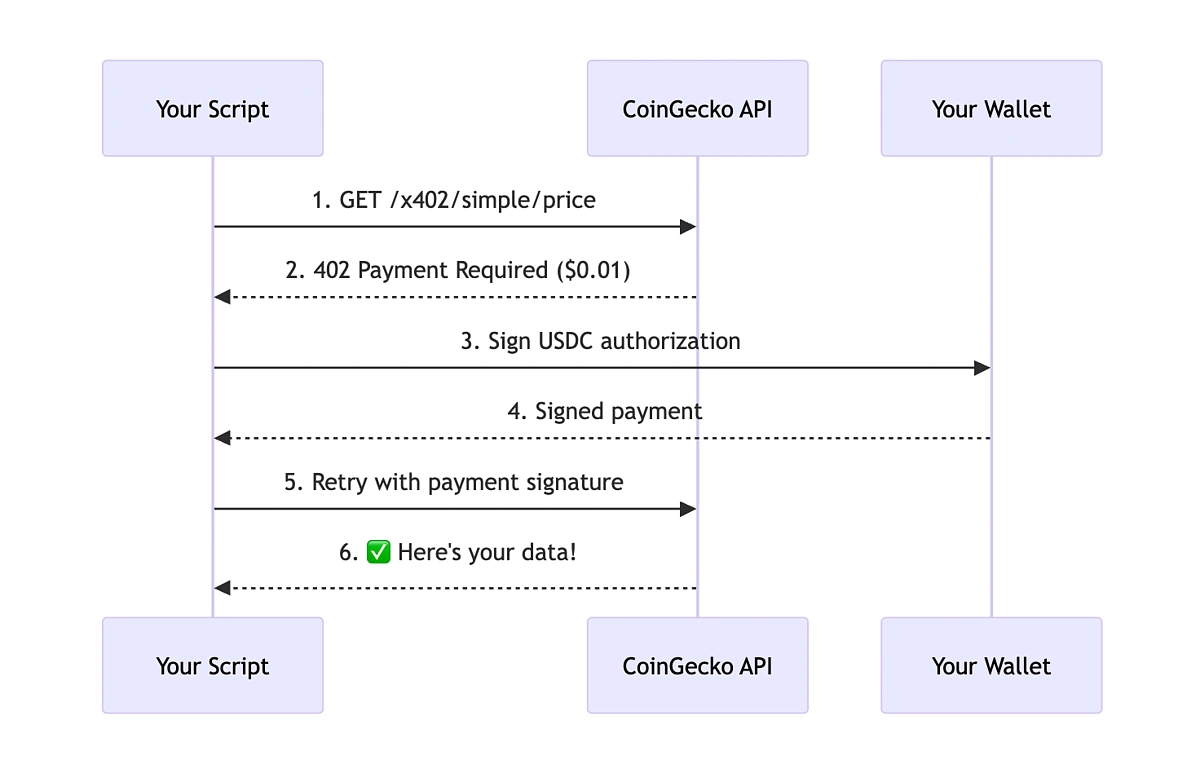
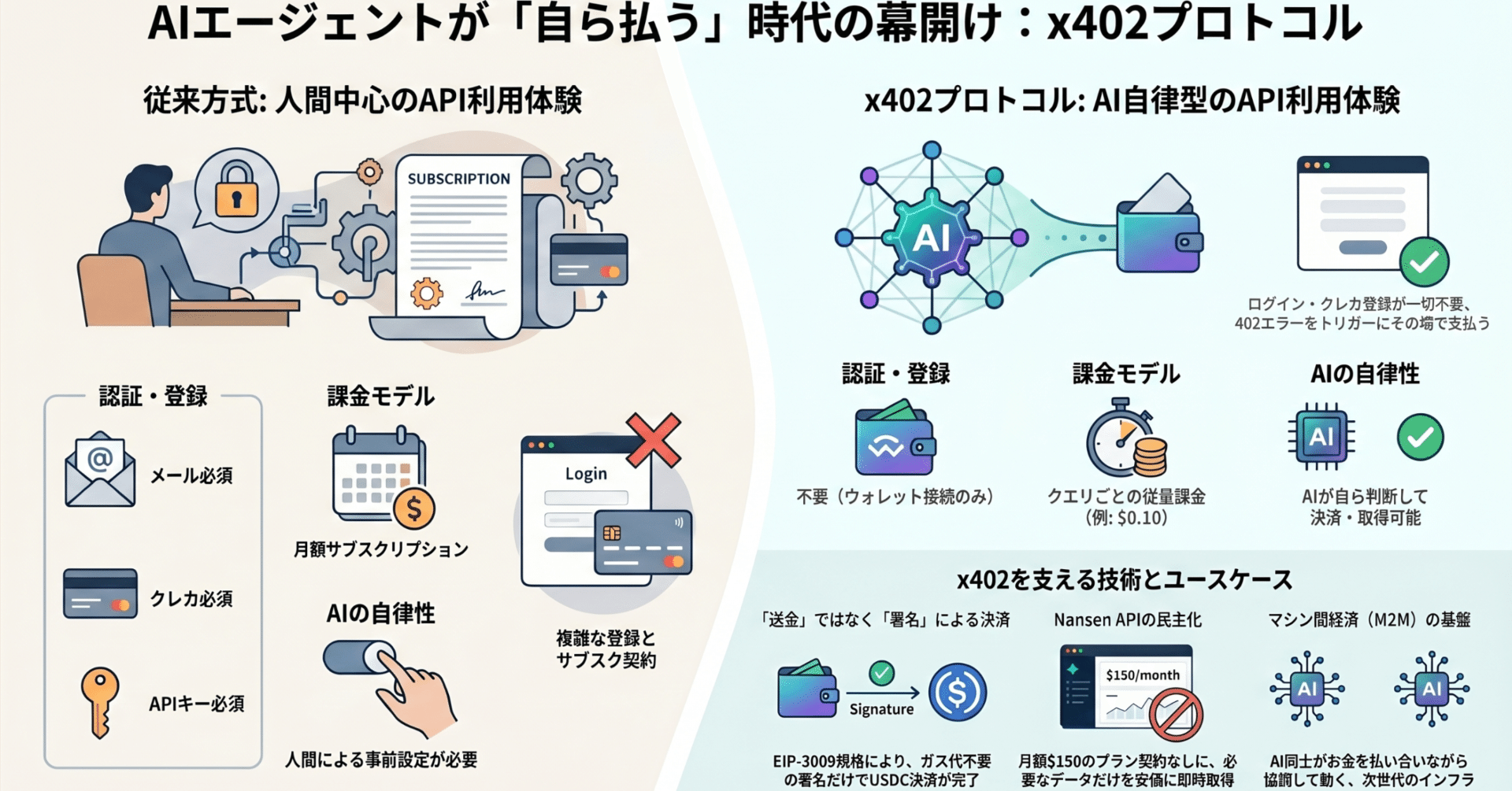
This setup creates a frictionless loop where access is granted only upon payment. It shifts the burden of billing from your infrastructure to the blockchain, enabling true agentic autonomy. For detailed technical definitions of the 402 status code, refer to the official MDN documentation.
Configure Endpoint Pricing
Pay-Per-API 402 works best as a sequence, not a scramble through settings. Do the minimum first: confirm compatibility, connect the core hardware, update only when needed, and test the result before adding optional features. That order keeps the task understandable and makes failures easier to isolate. After each step, pause long enough for the interface to finish syncing. Many setup problems are timing problems disguised as configuration problems. If the same step fails twice, record the exact error, restart the smallest affected piece, and retry before moving deeper.
The simplest way to use this section is to keep the setup small, verify each change, and record the stable configuration before adding optional accessories.
Handle the 402 Response Flow
Pay-Per-API 402 works best as a clear sequence: define the constraint, compare the realistic options, test the tradeoff, and choose the path with the fewest hidden costs. That order keeps the advice usable instead of decorative. After each step, pause long enough to check whether the recommendation still fits the reader's actual situation. If it depends on perfect timing, unusual access, or a best-case budget, include a simpler fallback.
Verify Payments and Grant Access
Once the agent submits the transaction hash, your server enters the verification phase. This is the most critical security step. You cannot trust the client's claim that payment occurred; you must independently confirm the blockchain state.
Confirm the Transaction on-Chain
Start by fetching the transaction details using the hash provided in the x-payment-hash header. Use a reliable block explorer API or your own node RPC endpoint to retrieve the transaction status. Check two things: the transaction has reached the required number of confirmations to prevent double-spending, and the recipient address matches your server's designated payment wallet.
If the transaction is still pending or the address is incorrect, return a 402 Payment Required error immediately. Do not proceed to the next step until the funds are irrevocably settled. This prevents agents from accessing data before the payment is finalized.
Validate the Payment Code
Next, decode the x-payment-code header. This code contains the proof of payment, including the transaction hash, the amount paid, and the specific resource URI being accessed. Verify that the amount matches the price set for that API endpoint. If the amount is too low, reject the request.
Also, check the expiration time embedded in the code. Payment codes are time-sensitive to prevent replay attacks where an agent reuses an old payment for a new request. If the code has expired, ask the agent to initiate a new payment flow.
Grant Access and Log the Event
When the transaction is confirmed and the code is valid, grant the agent access to the requested data. This might involve generating a short-lived session token or simply returning the API response directly if the payment is per-request.
Log the successful verification event. Include the transaction hash, the resource accessed, and the timestamp. This audit trail is essential for debugging payment issues and tracking revenue. By strictly verifying every payment before granting access, you ensure that your API remains secure and profitable.
Common Integration Mistakes
Building a pay-per-API flow is straightforward until the first failed transaction hits your logs. Most developers treat HTTP 402 like a standard error, but it is actually a payment instruction. If you do not handle the response body or network fees correctly, your agentic workflows will stall.
Ignoring the 402 Body
The 402 status code is reserved for digital payments, meaning the response body often contains critical payment instructions or error details rather than just a generic "unauthorized" message. If you only check the status code, you might miss the specific reason for the rejection or the required payment parameters. Always parse the response body to extract any payment hashes, error codes, or next-step instructions provided by the gateway.
Skipping Retry Logic
Agentic workflows are not linear; they are iterative. If a payment transaction fails due to network congestion or a temporary wallet issue, your agent should automatically retry with adjusted parameters rather than crashing. Implement exponential backoff for failed 402 responses. Without this, a single transient network glitch can break the entire agent loop, forcing a human to intervene.
Forgetting Network Fees
A common pitfall is calculating the API cost but ignoring the gas fee required to execute the transaction. If your endpoint pricing does not account for the underlying network's transaction costs, your agent will run out of funds before the request is processed. Always include a buffer for network fees in your endpoint pricing to avoid failed transactions.
Pay-Per-API 402 Implementation Checklist
Before you push to production, run through this sequence to ensure your agentic payment flows are robust. The goal is to eliminate friction for both the AI agent and the end user.
Ensure your API returns the correct 402 Payment Required status code when no payment is detected. This is the core signal that triggers the x402 protocol. Check MDN documentation for the standard definition.
Confirm your backend correctly validates the payment proof (usually a signed transaction or Lightning invoice receipt). The agent must be able to retry the request with the payment attached and receive a 200 OK response immediately.
Define clear error messages for failed transactions, expired invoices, or insufficient funds. Your API should never hang or return generic 500 errors during payment processing. Provide actionable feedback so the agent can adjust its strategy.
Use a test wallet to execute a full cycle: request, receive 402, pay, and receive data. Verify that the payment is recorded in your ledger and that the API response includes the requested data payload.
No comments yet. Be the first to share your thoughts!