What is pay-per-api 402
HTTP 402 is a reserved status code that has spent decades sitting in the documentation, unused and largely forgotten. The original RFC 7231 designated it for "future use," leaving developers to invent their own error codes for billing issues. Today, that space is being reclaimed by pay-per-api 402, a protocol that repurposes this standard for machine-to-machine micropayments.
The x402 standard, championed by implementations like Coinbase's, transforms this dormant code into a functional payment gateway. Instead of returning a generic "401 Unauthorized" or "403 Forbidden" when a request lacks funds, an API returns 402 Payment Required. This response includes a payload with a payment request, allowing an AI agent or software client to pay the exact amount needed to access the resource.
This approach eliminates the need for accounts, subscriptions, or credit card on file. It enables microtransactions at the protocol level, where a model might pay $0.001 to query a dataset or a bot might pay a small fee to access a premium API endpoint. The 402 code is no longer just an error; it is a transactional instruction.
Set up the payment gateway
Configuring an x402-compatible provider is the foundation of your Pay-Per-API 402 implementation. Whether you choose Coinbase Developer Platform (CDP) or Abstract API, the goal is to route API requests through a gateway that can verify on-chain payments before granting access.
This setup ensures that your API endpoints return a 402 Payment Required status when a user has not paid, and serves content once payment is confirmed. The following steps guide you through the initial configuration using the Coinbase Developer Platform as the primary example, as it offers robust SDK support for x402.
Start by logging into the Coinbase Developer Platform dashboard. Create a new project to isolate your Pay-Per-API 402 configuration from other applications. Once the project is active, navigate to the API Keys section and generate a new key pair. Store these credentials securely; you will need them to authenticate your backend requests to the CDP network. This key acts as your identity when interacting with the payment gateway.
Install the official x402 SDK in your project directory using your preferred package manager. For Node.js environments, this typically involves running npm install @coinbase/x402. After installation, initialize the client in your server-side code by passing your CDP API key. This client handles the complex logic of constructing payment proofs and verifying signatures from the blockchain, abstracting away the manual cryptographic steps.
Integrate the x402 middleware into your API route handlers. This middleware intercepts incoming requests and checks for a valid payment proof in the headers. If no proof is found, the middleware automatically returns a 402 Payment Required response, blocking access to the resource. If a proof is present, it verifies the transaction on-chain. Only upon successful verification does the request proceed to your business logic. This ensures that every API call is backed by a confirmed payment.
Before deploying to production, test your setup using a testnet environment. Send a small amount of testnet stablecoins to the address associated with your x402 client. Then, make an API request with the corresponding payment proof. Verify that the middleware correctly identifies the payment and returns the expected 200 OK response. This step confirms that your gateway is correctly interpreting on-chain data and that your API endpoints are properly secured.
Configure endpoint pricing
With x402, you move away from flat-rate subscriptions and start charging for actual usage. This means mapping specific API endpoints to price tiers, such as $0.001 per request, and defining the currency—usually USDC or ETH. The goal is to make every call count, ensuring you are paid before the resource is delivered.
To implement this, you first define your pricing logic in your backend configuration. Each endpoint needs a clear cost attached to it. When a client requests an endpoint, the server checks the balance. If the balance is insufficient, the server returns an HTTP 402 status code, signaling that payment is required.
This approach shifts the billing model from "pay now, use later" to "pay to use." It is particularly effective for high-volume, low-cost operations where traditional billing would be too heavy. By integrating x402, you allow AI agents and clients to pay seamlessly with crypto, removing the need for accounts or credit cards.
To understand the difference, compare the two models below:
| Feature | Traditional API Billing | Pay-Per-API 402 |
|---|---|---|
| Billing Cycle | Monthly or annual subscription | Per-request microtransaction |
| Payment Method | Credit card, bank transfer | USDC, ETH, or other crypto |
| Access Control | Token-based, account-based | Payment-gated, instant access |
| Cost Structure | Fixed fee, overage charges | Pay exactly for what you use |
| User Friction | High (sign-up, billing details) | Low (wallet connection) |
This table highlights why x402 is becoming the standard for internet-native payments. It removes the friction of traditional billing, allowing for more flexible and scalable API monetization.
Handle 402 responses in code
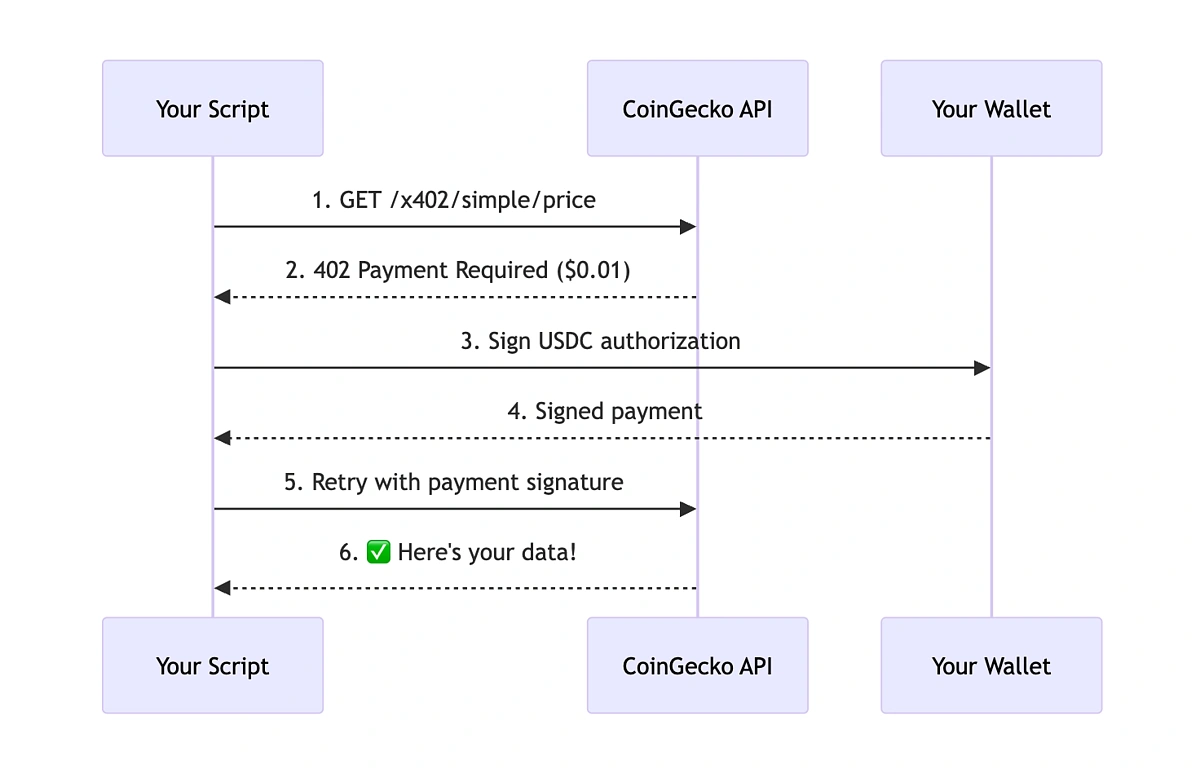
When your API client receives an HTTP 402 status, it signals that the requested resource is behind a paywall. Unlike 401 (unauthorized) or 403 (forbidden), 402 is specifically reserved for payment requirements. To implement this, your client needs a three-part flow: detect the payment error, trigger a wallet transaction, and retry the original request.
This process turns a blocking error into a seamless transaction. We will use the x402 standard, which defines how Web3 payments integrate with HTTP responses. The following steps outline the exact sequence your code should follow to handle these payments without confusing the user.
Start by intercepting API responses. When a fetch or axios request completes, check if the status is 402. If it is, parse the response body for payment instructions. These instructions typically include the required currency, amount, and a unique transaction ID or payment URI. Do not proceed with the data; instead, pause and prepare for payment.
Once you have the payment details, prompt the user to sign a transaction. Use a Web3 provider like WalletConnect or MetaMask to execute the payment. The transaction should include the exact amount and recipient specified in the 402 response. Ensure the transaction is broadcast to the blockchain and wait for confirmation. This step bridges the gap between the HTTP error and the blockchain state.
After the transaction is confirmed on-chain, retry the original API request. Attach the transaction hash or a payment proof header to the retry. This allows the server to verify the payment and grant access to the resource. If the server accepts the proof, return the data to the user. If it rejects it, handle the error gracefully by asking the user to retry or contact support.
Implementing this flow ensures that your API clients respect payment boundaries while maintaining a smooth user experience. By treating 402 as a payment trigger rather than a hard error, you enable microtransactions that scale with usage.
Common integration mistakes
Even with a solid plan for x402, implementation details can trip up your workflow. The biggest errors usually stem from confusing HTTP semantics or underestimating the realities of on-chain transactions. Here is how to avoid the most common pitfalls.
Confusing 402 with 403
The most frequent mistake is treating 402 Payment Required as a generic permission error. In standard REST design, 403 Forbidden signals that the user is authenticated but lacks the authority to access a resource. 402, by contrast, is a specific signal that access is granted if payment is made.
If your API returns 403 when a wallet hasn't paid, your client-side logic will likely block the request entirely, breaking the micropayment flow. Instead, use 402 to explicitly tell the client: "You are authorized, but the payment gate is closed." This distinction allows your x402 middleware to intercept the response and trigger the wallet signature request rather than throwing a hard access denied error.
Ignoring transaction latency
Web3 transactions are not instant. When your agent workflow calls an API, it must wait for the transaction to be confirmed on-chain before releasing data. A common error is assuming immediate finality and timing out the request too quickly.
If you don't account for block times, your client will think the payment failed and retry, causing duplicate charges or race conditions. Implement a polling mechanism or use WebSocket subscriptions to listen for the specific transaction hash. Only return the 200 OK with the API data once the transaction is sufficiently confirmed. This prevents your agents from getting stuck in retry loops while waiting for the blockchain to catch up.
Overlooking gas edge cases
Another subtle issue is failing to handle gas price fluctuations. If your x402 implementation hardcodes a gas limit or fee, a sudden spike in network congestion can cause the transaction to revert or fail mid-flow. Always allow for dynamic gas estimation or implement a fallback mechanism that notifies the user if the gas cost exceeds their expected threshold. This keeps the payment experience smooth even during high-traffic network periods.
Pay-per-api 402 implementation checklist
Before pushing your x402-enabled API to production, run through this verification sequence. The goal is to ensure your server correctly rejects unpaid requests and your clients handle the 402 response without crashing.
Once these checks pass, you are ready to deploy. Monitor your logs closely for the first 24 hours to catch any unexpected payment verification failures.
No comments yet. Be the first to share your thoughts!